What a free AI face age test actually measures — and why the photo matters more than you think.
Last updated: September 29, 2026 · 8 min read
Have you ever looked at a photo and wondered, “How old do I look?”
An AI age guesser can estimate your apparent age from a photo in seconds. But the number it gives you is not necessarily your actual age. It is a face age estimate based on how your face appears in that particular image.
And the photo matters more than you might think.
Lighting, facial expression, camera angle, filters, and image quality can all change the visual information available to an AI age detection model.
We tested this ourselves with FaceAgeCalc. Using four images designed to show the same AI-generated fictional adult face under different photo conditions, we received estimates ranging from 21 to 30.
The biggest difference came from something surprisingly simple: a smile.
Try the free FaceAgeCalc Age Calculator by PhotoBefore asking AI to guess your age, it helps to understand what it is actually estimating.
Your chronological age is your real age based on your date of birth. If you were born 25 years ago, your chronological age is 25.
Your apparent age is different. It describes how old you appear based on visible information in a particular photo.
That means a FaceAgeCalc result of 27 does not prove that you are 27 years old. It means the model produced a facial age estimate from the face visible in the photo you provided.
This distinction also helps explain why the same person can appear younger or older across different photos.
A picture taken in soft daylight may look different from one taken under harsh indoor lighting. A neutral expression changes when you smile. Moving the camera can change how facial proportions appear in the final image.
So when asking “How old do I look?”, think of the result as an estimate of your appearance in that photo — not a replacement for your actual age.
An AI age guesser analyzes visual patterns in a face and uses a trained model to produce an estimated age.
Photo → Face detected → Visual patterns analyzed → Age estimated
The important word is estimated.
The AI does not know your birthday simply by looking at your face. Instead, face age detection works from visual information in the image.
A clear, front-facing portrait in even lighting provides different input from a blurry selfie, a heavily filtered photo, or an image taken from an unusual angle.
This distinction is also used in formal evaluations of age-estimation technology. NIST describes facial age estimation as analysis of a face to produce an age estimate, rather than identification of who the person is.
FaceAgeCalc runs on face-api.js, an open-source face-analysis library — and the analysis happens entirely inside your browser, so your photo is never uploaded anywhere.
Rather than simply saying photo conditions can matter, we decided to test them.
For this demonstration, we created four AI-generated images designed to depict the same fictional adult face.
We kept the overall appearance similar while changing one major photo condition at a time: neutral expression with even lighting, warmer and dimmer lighting, a smiling expression, and a slight side angle.
Each image was then tested separately using FaceAgeCalc.
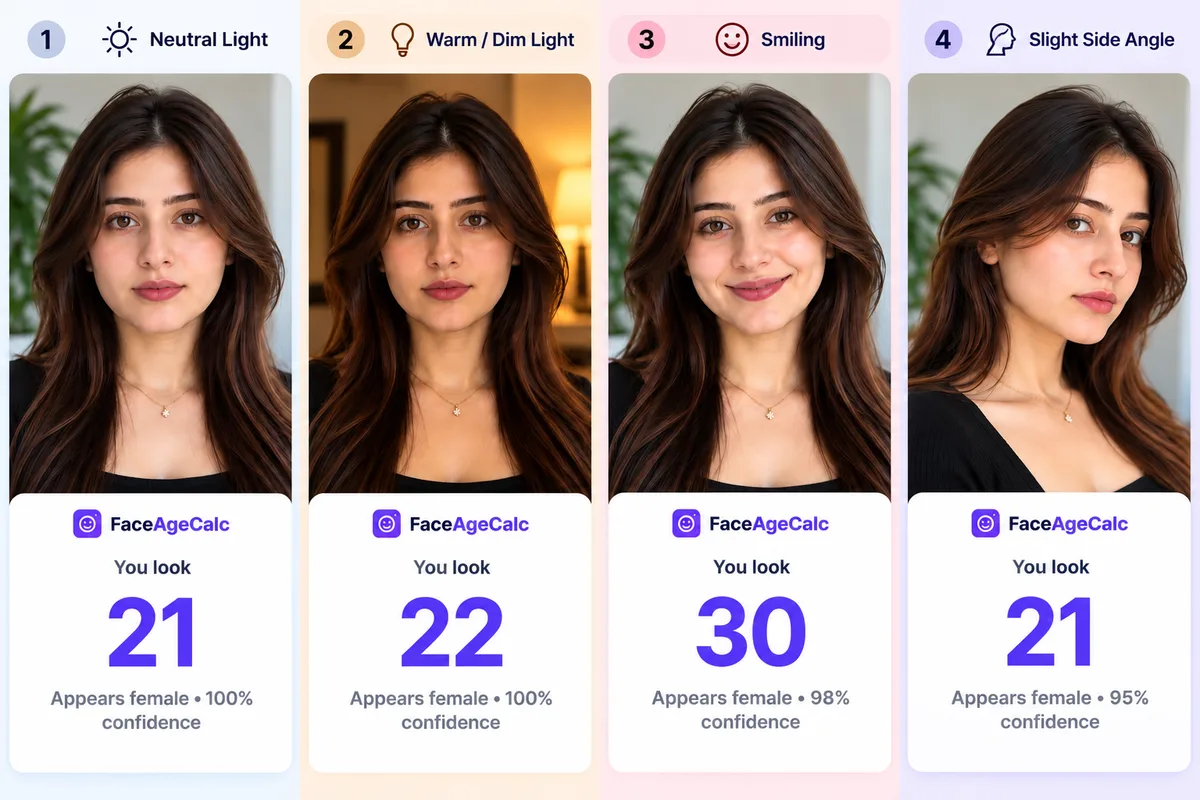
| Photo condition | Estimated age | Change vs. baseline |
|---|---|---|
| Neutral, even daylight (baseline) | 21 | 0 (no change) |
| Warm, dim indoor light | 22 | +1 |
| Smiling | 30 | +9 |
| Slight side angle | 21 | 0 |
The largest difference did not come from the darker lighting or the side angle. It came from the smiling photo.
Our neutral image produced an estimated age of 21. Warmer, dimmer lighting moved the result to 22. The slight side-angle photo returned 21 again.
But the smiling image returned an estimated age of 30 — a difference of nine years from the neutral baseline.
That was easily the biggest change in our four-photo test.
No. That is not what this test proves.
This was a small demonstration using four AI-generated images designed to represent one fictional adult face. It was not a scientific accuracy study, and a synthetic face does not have a real chronological age against which accuracy can be measured.
The result therefore does not mean smiling generally makes people look older.
It does show why photo-to-photo variation matters. NIST has reported that age estimates can vary when facial expression or other presentation conditions change.
Another person, another model, or another set of photos could produce very different results. One age estimate should not be treated as a permanent judgment about how old you look.
Lighting changes the appearance of shadows, contrast, texture, and facial contours.
Soft, even light generally produces a clearer image of the face. Strong overhead light, very dim lighting, or light coming heavily from one side can create a different-looking photo.
In our demonstration, switching from even daylight to warmer, dimmer lighting changed the face age estimate from 21 to 22.
For a cleaner baseline, try taking a photo near a window during the day while avoiding strong direct sunlight.
Your face does not physically change when you move your phone, but the photograph can.
A camera placed too close to the face can exaggerate perspective. A high or low camera position can also change how different facial areas appear relative to one another.
For your first test, keep the camera roughly at eye level and look toward it naturally.
Our slight side-angle image still returned 21, the same as the neutral baseline. That does not mean angle never matters — it simply reports what happened in this particular test.
Your facial appearance changes when your expression changes.
Smiling affects the cheeks, mouth, eye area, and other visible parts of the face. A surprised expression, squint, or broad grin can also change what is visible in an image.
Expression produced the largest difference in our test: the neutral image returned 21, while the smiling image returned 30.
This does not establish a general rule that smiling increases AI age estimates. It shows why keeping your expression reasonably consistent can be useful when comparing results.
Beauty filters can smooth skin, reshape facial features, alter contrast, sharpen details, or make other changes to a photograph.
Once an image has been edited, the AI is analyzing the edited version.
If you want a useful baseline, start with a clear, unfiltered photo. Then try the filtered version separately if you want to compare the results.
A clear face gives an age-estimation model better visual input than a tiny, blurry, heavily compressed, or partially hidden face.
For your first test, use a photo where your face is clearly visible, reasonably sharp, not heavily shadowed, not covered by sunglasses or a mask, and large enough within the image to see easily.
You do not need a professional studio portrait. A simple, clear phone photo can be enough.
Face a window or another soft light source. Avoid very dark rooms and strong shadows across the face.
Start with a straightforward front-facing portrait. You can experiment with other angles afterward.
Move hair or other objects away if they cover a large part of your face. Avoid sunglasses and masks for your baseline test.
An unfiltered photo gives you a cleaner starting point for comparison.
One result can be interesting, but several similar photos provide more context. Take three photos under similar lighting, from approximately the same angle, with the same expression, and compare the results rather than focusing entirely on one number.
An AI age result is an estimate, not an exact measurement of chronological age.
Independent testing also shows that performance varies by algorithm and image conditions. NIST’s ongoing Face Analysis Technology Evaluation benchmarks age-estimation systems across different datasets and conditions.
Our four-photo demonstration is not an accuracy benchmark because the fictional face has no real age. Its purpose is to show that the model’s output can change when the image changes.
For a deeper explanation, read How Accurate Is AI Age Detection?.
Short answer: with FaceAgeCalc, yes — because your photo never leaves your device.
FaceAgeCalc analyzes photos entirely inside your browser. When you upload, paste, or link a photo, it is loaded into your browser’s memory, analyzed locally by on-device AI, and never sent to our servers or any third party. Refreshing or closing the page removes it from memory completely.
We don’t ask you to sign up, and we don’t store your photos anywhere. Read the full privacy policy.
That is not how every AI photo tool works, though. Before uploading a face photo anywhere else, it is worth checking where the image is processed, whether it is sent to a remote server, whether it is retained after processing, and what the site’s privacy policy actually says. Never assume every tool handles images the way FaceAgeCalc does.
A FaceAgeCalc result answers a narrow question: What age does the model estimate from this particular photo?
Think of the result as an interesting estimate based on your photograph — not an official measurement.
No. AI can estimate an apparent age from visible information in a photo, but it cannot determine your exact chronological age simply by looking at your face. Your date of birth remains the reliable source of your actual age.
The model is estimating from one particular image. Lighting, expression, camera angle, filters, image quality, and your appearance in that photograph can all affect the visual input. Try another clear photo under similar conditions before drawing conclusions from one result.
For the same reason an estimate can be higher than your actual age, it can also be lower. The system is predicting apparent age from a photo rather than checking your real birth date.
Every photograph captures your face under slightly different conditions. Changes in lighting, angle, distance, expression, image quality, and editing can change the visual information available to an age-estimation model. Our four-image demonstration returned 21, 22, 30, and 21 for images designed to depict the same fictional face.
It can affect the image being analyzed. Lighting changes visible shadows, contrast, and facial detail. In our demonstration, warmer and dimmer lighting changed the estimate from 21 to 22, although results from one test should not be generalized to everyone.
Potentially. Filters and editing can alter the visual information in a photo. For the cleanest comparison, start with an unfiltered image and test edited versions separately.
Yes, especially if you are curious about consistency. Try two or three similar photos under comparable conditions and see whether the estimates stay close or change.
The easiest way to find out what the AI estimates is to try it yourself.
Start with a clear, front-facing photo in even lighting. Note your result, then test another similar photo.
After that, experiment. Smile. Change the lighting. Try a slight angle.
Our own test showed why this can be interesting: four images designed around the same fictional face produced estimates ranging from 21 to 30.
Just remember what the number means.
It is an AI estimate of apparent age from a particular photo — not your birthday.
Try the free FaceAgeCalc Age Calculator by PhotoHow close AI age detection gets — and what affects it.
Why your photo never leaving your phone matters.
Sleep, sun, stress and more — what actually moves facial age.